The Ralph Pentest Loop: Adapting AI Agent Loops for Security Testing
How I adapted the Ralph Wiggum autonomous agent pattern for penetration testing with static analysis and dynamic validation
How I adapted the Ralph Wiggum autonomous agent pattern for penetration testing with static analysis and dynamic validation
Table of Contents
- Introduction
- What is the Ralph Wiggum Loop?
- The Target: OWASP Juice Shop
- Architecture Overview
- Stage 1: Ralph Code Review
- Stage 2: Ralph Pentester
- Burp Suite MCP Integration
- Putting It All Together
- References
Introduction
The Ralph Wiggum technique is an autonomous AI agent pattern created by Geoffrey Huntley. Named after the Simpsons character who is perpetually confused but never gives up, the technique embodies a simple philosophy: persistence through iteration rather than seeking immediate perfection. At its core, Ralph is just a bash loop that repeatedly feeds a prompt to an AI agent, letting the agent observe its previous work and progressively improve.
We adapted this pattern for penetration testing. The Ralph Pentest Loop combines static code analysis with dynamic exploit validation in a two-stage pipeline. The first stage reviews source code to identify vulnerabilities and generates a test plan; the second stage executes those tests against a live application using browser automation and an intercepting proxy.
This approach isn’t meant to replace manual penetration testing—experienced pentesters bring intuition, creativity, and contextual judgment that AI doesn’t replicate. (I’m not entirely sure that’s still true, and if it is, I don’t know for how much longer.) Instead, it augments the process by handling systematic tasks: methodically tracing every input through every code path, ensuring no endpoint is overlooked, and providing reproducible test cases with evidence.
What is the Ralph Wiggum Loop?
The Ralph Wiggum technique is an iterative AI development methodology. In its purest form, it’s a while loop that repeatedly feeds an AI agent a prompt until completion criteria are met. Each iteration isn’t starting fresh—the agent sees what it built in the last round, reviews its own work, notices what’s broken, and fixes it.
As Huntley describes it: “The technique is deterministically bad in an undeterministic world. It’s better to fail predictably than succeed unpredictably.”
The key insight is that failures become data. Each iteration refines the approach based on what broke. This inverts the usual AI workflow: instead of reviewing each step, you define success criteria upfront and let the agent iterate toward them.
When I first encountered this pattern, I wondered how it might apply to penetration testing. Claude Code already had access to Chrome for dynamic testing via the browser automation extension. It could read source code directly from the filesystem. And I had built a Burp Suite MCP that let Claude instrument Burp programmatically—sending requests, inspecting proxy history, setting up Repeater tabs. All the pieces were there. The question was whether wrapping them in an autonomous loop could produce useful security analysis, or whether it would just burn tokens generating nonsense.
The Target: OWASP Juice Shop
For this experiment, I needed a target application—something with real vulnerabilities to find and exploit. I went with OWASP Juice Shop, the intentionally vulnerable web application.
Juice Shop is well-documented, easy to spin up, and has a known set of vulnerabilities across the OWASP Top 10. But there’s an obvious problem: Claude was almost certainly trained on Juice Shop. The walkthroughs, the solution guides, the GitHub issues discussing each vulnerability—all of that is in the training data. Any results I got could be the model pattern-matching to memorized solutions rather than actually performing security analysis. So there is that…..
To mitigate this, I went through the Juice Shop repository and stripped out everything that looked like hints or solutions—the challenge descriptions, the flags, the embedded hints in comments. It’s not a perfect solution; the model might still “remember” things about Juice Shop’s architecture. But it was the best I could do without building a completely novel vulnerable application from scratch, which would have been a project in itself.
Architecture Overview
The Ralph Pentest Loop operates as a two-stage pipeline with shared state. The first stage, ralph-code-review, performs static analysis on source code. It identifies all entry points (HTTP endpoints, API routes), ranks them by potential security impact to prioritize high-value targets, then traces user input from source to sink looking for dangerous patterns. When it finds vulnerabilities, it generates exploit code. I’ll expand on each of these phases later in the post. The second stage, ralph-pentester, takes that test plan and validates each finding against a live application using browser automation and an intercepting proxy.
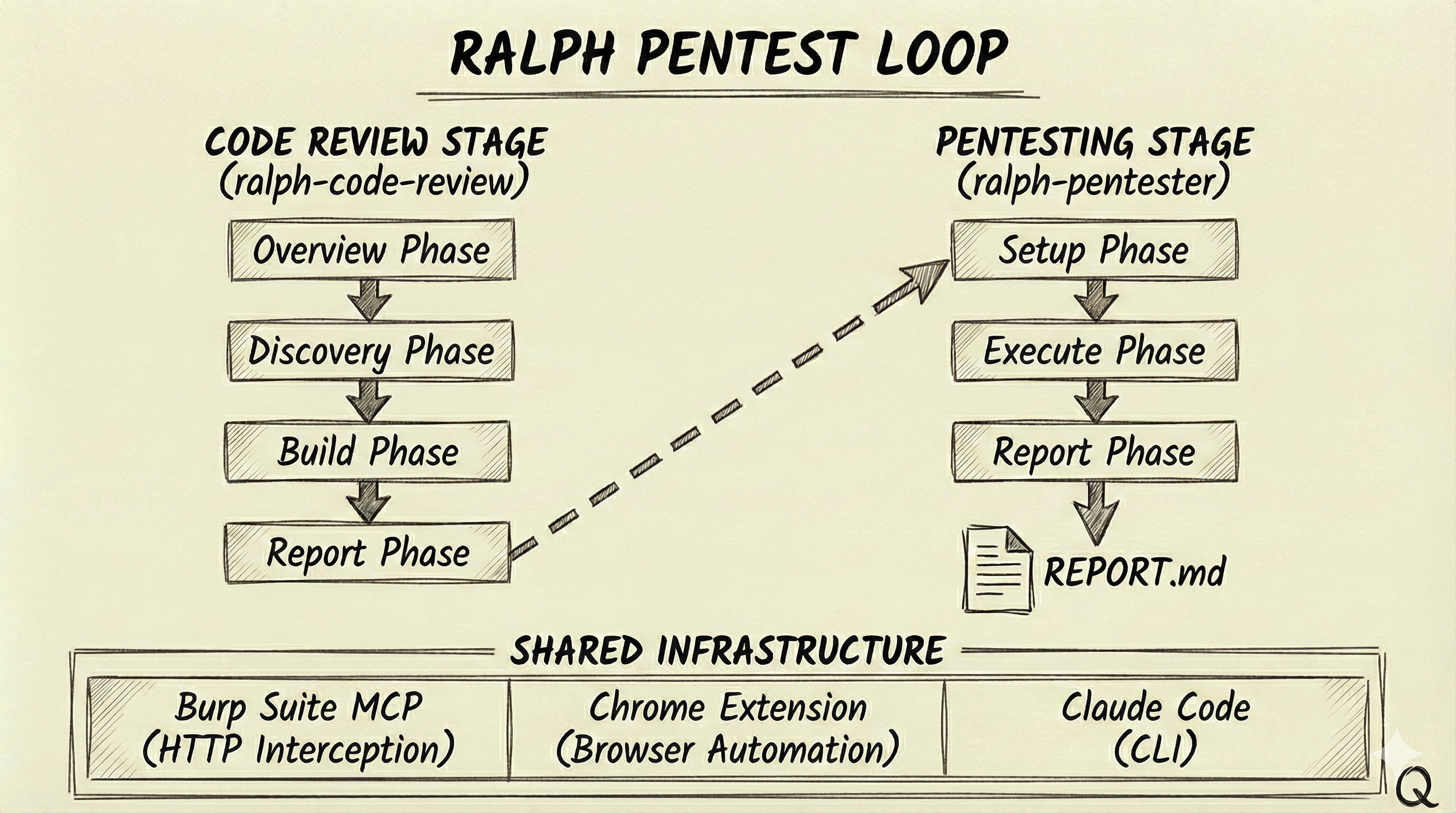
Both stages share infrastructure: Burp Suite MCP for HTTP interception and traffic analysis, a Chrome extension for browser automation, and Claude Code as the underlying AI engine. State is persisted in JSON files (review.json for code review, pentest.json for testing) that track progress, stories, findings, and results across iterations.
Stage 1: Ralph Code Review
The code review stage performs static analysis using a story-based execution model. Rather than running a single pass over the codebase, it breaks the work into discrete “stories” that form a dependency graph, processing them in priority order until complete.
The Four Phases
The analysis proceeds through four phases. The Overview Phase comes first—the agent explores the codebase to understand the application architecture, identify the framework, map authentication mechanisms, and flag high-risk areas. This context informs everything that follows.
The Discovery Phase finds and ranks all HTTP endpoints by security priority. Every route, controller, and API endpoint gets documented with its inputs and authentication requirements. Not all endpoints carry the same risk. I’ll be honest—the main reason I implemented priority ranking was cost. Running Claude Code against every endpoint in a large codebase gets expensive fast, and I needed a way to focus the analysis on what actually matters. The discovery phase assigns a priority_rank (0-100%) to each endpoint based on additive factors:
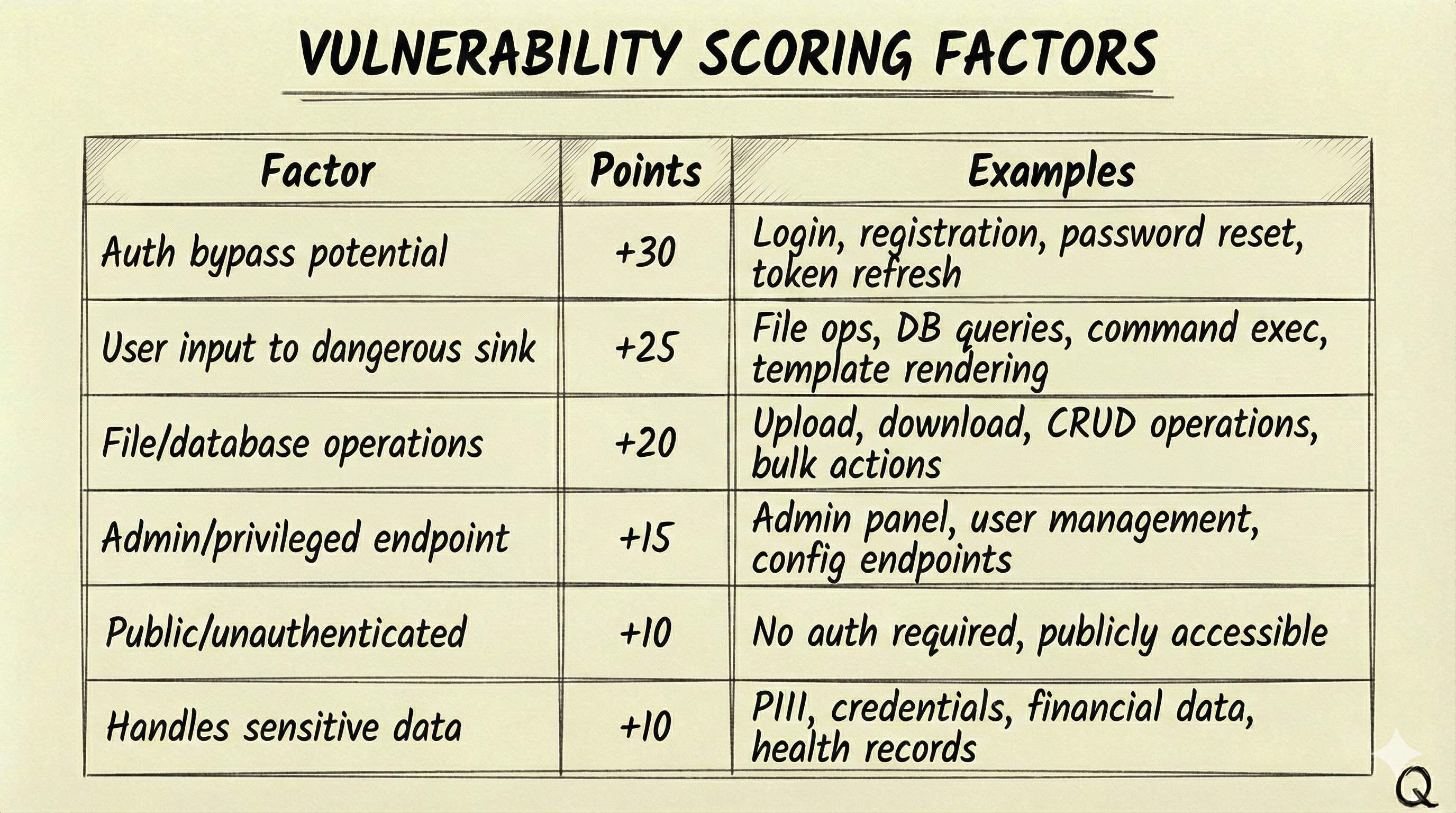
A POST /api/admin/users endpoint handling user creation would score 60% (admin +15, user input to DB +25, DB operations +20). A login endpoint scores 55% (auth bypass potential +30, user input to DB +25). This ensures high-risk endpoints like admin panels and authentication flows get analyzed before lower-priority static content.
The Build Phase traces user inputs from source to sink. For each endpoint discovered, the agent follows data through function calls, transformations, and database operations to identify dangerous patterns. This is where the story-based model really matters—each endpoint story spawns trace stories for its inputs, which spawn analysis stories when dangerous sinks are found, which spawn exploit stories when vulnerabilities are confirmed:
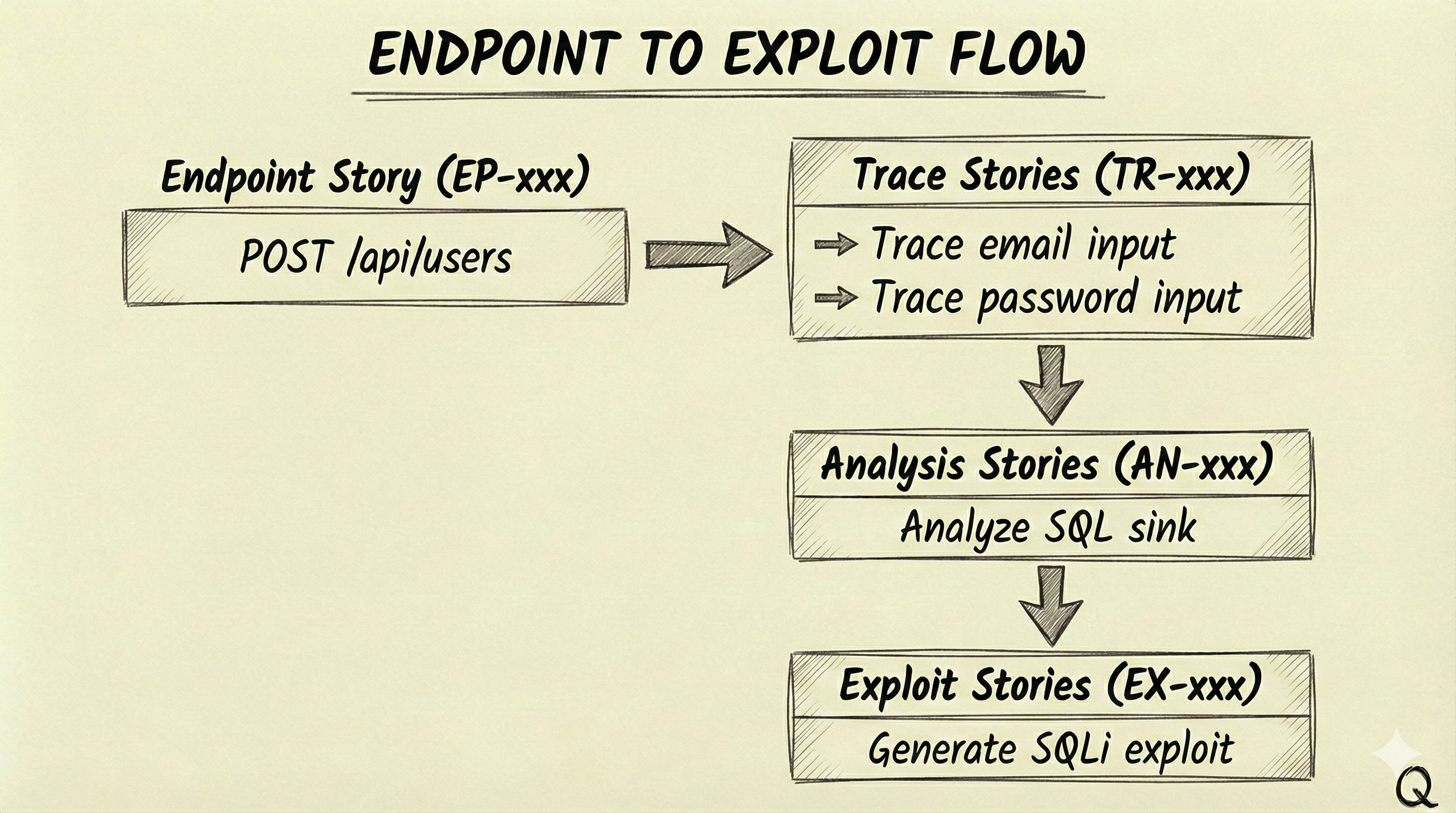
Priority inheritance ensures that child stories maintain their parent’s priority. A high-priority endpoint’s traces and analyses are processed before moving to lower-priority endpoints.
Finally, the Report Phase generates TEST_PLAN.md with ready-to-execute exploit code for each confirmed vulnerability. The test plan includes a quick reference table mapping test case IDs to severities, types, and endpoints, followed by detailed sections for each finding with curl commands, Python scripts, and verification steps.
Signal-Based Completion
The agent signals completion using structured tags that the bash loop detects. <review>NEW_STORY>{"id":"TR-001",...}</review> creates new work items. <review>FINDING>{"id":"VULN-001",...}</review> reports vulnerabilities. <review>COMPLETE</review> marks a story finished. <review>DISCOVERY_COMPLETE</review> signals a phase is done.
The loop engine parses these signals from Claude’s output using regex, then updates review.json. Here’s the relevant section from ralph-code-review/.agents/ralph-review/loop.sh:
1
2
3
4
5
6
7
8
9
10
11
12
13
14
15
16
17
18
19
20
21
22
23
24
25
# Find all NEW_STORY tags in Claude's output
pattern = r'<review>NEW_STORY>(.*?)</review>'
matches = re.findall(pattern, content, re.DOTALL)

# Load current review state
with open(review_file, "r") as f:
    data = json.load(f)

existing_ids = {s["id"] for s in data.get("stories", [])}

# Add new stories
for match in matches:
    try:
        new_story = json.loads(match.strip())
        if new_story.get("id") not in existing_ids:
            new_story.setdefault("status", "open")
            new_story.setdefault("dependsOn", [])
            data["stories"].append(new_story)
            existing_ids.add(new_story["id"])
    except json.JSONDecodeError as e:
        print(f"Warning: Could not parse story: {e}", file=sys.stderr)

# Save updated review
with open(review_file, "w") as f:
    json.dump(data, f, indent=2)
This is intentionally simple—regex to find the tags, JSON parsing to extract the data, and file I/O to persist state. The same pattern handles findings, exploits, and phase completion signals.
The final output of this stage is TEST_PLAN.md, which looks something like this:
1
2
3
4
5
6
7
8
9
10
11
12
13
14
15
16
17
18
19
20
21
22
23
24
25
26
27
28
29
30
# Security Test Plan

## Quick Reference

| TC-ID  | Severity | Type          | Endpoint           | Auth |
|--------|----------|---------------|--------------------|------|
| TC-001 | CRITICAL | SQL Injection | POST /api/login    | No   |
| TC-002 | HIGH     | Stored XSS    | POST /api/comments | Yes  |
| TC-003 | HIGH     | IDOR          | GET /api/users/:id | Yes  |

---

### TC-001: SQL Injection in Login

**Severity:** CRITICAL
**Category:** A03:2021 - Injection
**Endpoint:** `POST /api/login`

#### Description
The login endpoint concatenates user input directly into a SQL query
without parameterization. The `email` field is vulnerable.

#### Exploit

curl -X POST '{{TARGET_URL}}/api/login' \
  -H 'Content-Type: application/json' \
  -d '{"email": "admin'\''--", "password": "x"}'

#### Expected Result
Returns admin user data without valid password, or SQL error is visible.
The {{TARGET_URL}} placeholder gets replaced at execution time when the pentester runs against the live application.
Stage 2: Ralph Pentester
The pentester stage takes TEST_PLAN.md as input and executes each test case against the live application. Where the code review stage works with static source code, the pentester works with a running system—using browser automation and an intercepting proxy (Burp Suite in this case) to validate vulnerabilities with real evidence.
Launching Claude Code with both capabilities looks like this:
1
2
3
4
5
6
# Allow both Chrome browser automation and Burp MCP tools
ALLOWED_TOOLS="mcp__claude-in-chrome__*,mcp__burp__*"

claude --chrome -p "$PROMPT" \
    --allowedTools "$ALLOWED_TOOLS" \
    --output-format "stream-json"
The --chrome flag enables browser automation via the Claude in Chrome extension, and --allowedTools grants access to the Burp MCP tools for HTTP interception and traffic analysis.
Execution Flow
The stage proceeds through three phases. The Setup Phase creates a test account, captures authentication tokens (usually a JWT), and configures Burp Suite’s scope for the target domain. The Execute Phase runs each test case with up to 5 iterations per test. Here’s the core loop from ralph-pentester/.agents/ralph-pentest/loop.sh:
1
2
3
4
5
6
7
8
9
10
11
12
13
14
15
16
17
18
19
20
21
22
23
24
25
26
27
28
29
30
31
32
while [ "$TEST_ITERATION" -le "$MAX_ITERATIONS_PER_TEST" ] && [ "$TEST_DONE" = "false" ]; do
  log_info "  Attempt ${TEST_ITERATION}/${MAX_ITERATIONS_PER_TEST}"

  # Build prompt and run agent
  build_iteration_prompt "$TEST_ID" "$TEST_ITERATION" > "$PROMPT_FILE"
  run_agent "$PROMPT_FILE" "$LOG_FILE"

  # Check for completion signals
  if grep -q "<pentest>TEST_COMPLETE</pentest>" "$LOG_FILE"; then
    log_success "  ✓ Vulnerability CONFIRMED"
    update_test_status "$TEST_ID" "completed"
    TEST_DONE=true
  elif grep -q "<pentest>TEST_FAILED</pentest>" "$LOG_FILE"; then
    log_info "  ✗ Not vulnerable"
    update_test_status "$TEST_ID" "failed"
    TEST_DONE=true
  elif grep -q "<pentest>TEST_SKIPPED</pentest>" "$LOG_FILE"; then
    log_warn "  ⊘ Skipped (prerequisites not met)"
    update_test_status "$TEST_ID" "skipped"
    TEST_DONE=true
  else
    log_info "  → No signal, continuing..."
  fi

  TEST_ITERATION=$((TEST_ITERATION + 1))
done

# If max iterations reached without signal, mark as timeout
if [ "$TEST_DONE" = "false" ]; then
  log_warn "  ⏱ Max iterations reached, marking as timeout"
  update_test_status "$TEST_ID" "failed"
fi
The Report Phase generates REPORT.md with confirmed vulnerabilities and collected evidence.
The iteration model is important to the execute phase. On iterations 1-2, the agent executes the documented exploit exactly as specified in the test plan. If those attempts fail, iterations 3-4 try variations and bypasses. Iteration 5 is the final attempt before concluding with failure. This structured approach balances thoroughness with efficiency—most valid vulnerabilities confirm quickly, while false positives from static analysis get filtered out without burning excessive iterations. I got better results with higher iteration counts, but costs add up fast; five was enough to demonstrate the concept.
Tool selection depends on the exploit type. HTTP API exploits use bash with curl. Complex payload encoding uses Python scripts. Form-based attacks use the browser automation tools (form_input, computer). XSS verification uses javascript_tool to check if payloads executed in the page context. Traffic inspection goes through Burp’s get_proxy_history, and manual testing gets set up in Repeater via send_to_repeater. Point is the agent figures this out!
Completion Signals
After executing a test, the agent outputs one of three signals. <pentest>TEST_COMPLETE</pentest> means the vulnerability was confirmed with evidence. <pentest>TEST_FAILED</pentest> means the target isn’t vulnerable—the attack was blocked or input was sanitized. <pentest>TEST_SKIPPED</pentest> means prerequisites weren’t met, like a 404 on the endpoint or missing authentication. If the result is inconclusive and more iterations might help, no signal is output and the loop continues.
Burp Suite MCP Integration
Quick note on Burp - the MCP bridge enables the agent to interact with Burp Suite programmatically. This basically transforms Burp from an interactive tool into an automated testing platform.
Architecture
The integration uses a three-tier architecture. Claude Code CLI communicates via the Model Context Protocol (MCP) over stdio to an MCP server written in TypeScript/Node.js. The MCP server converts tool calls to JSON-RPC 2.0 requests and sends them over WebSocket to a Burp extension written in Java. The extension hooks into Burp’s internals via the Montoya API, executing requests and returning results back up the chain.
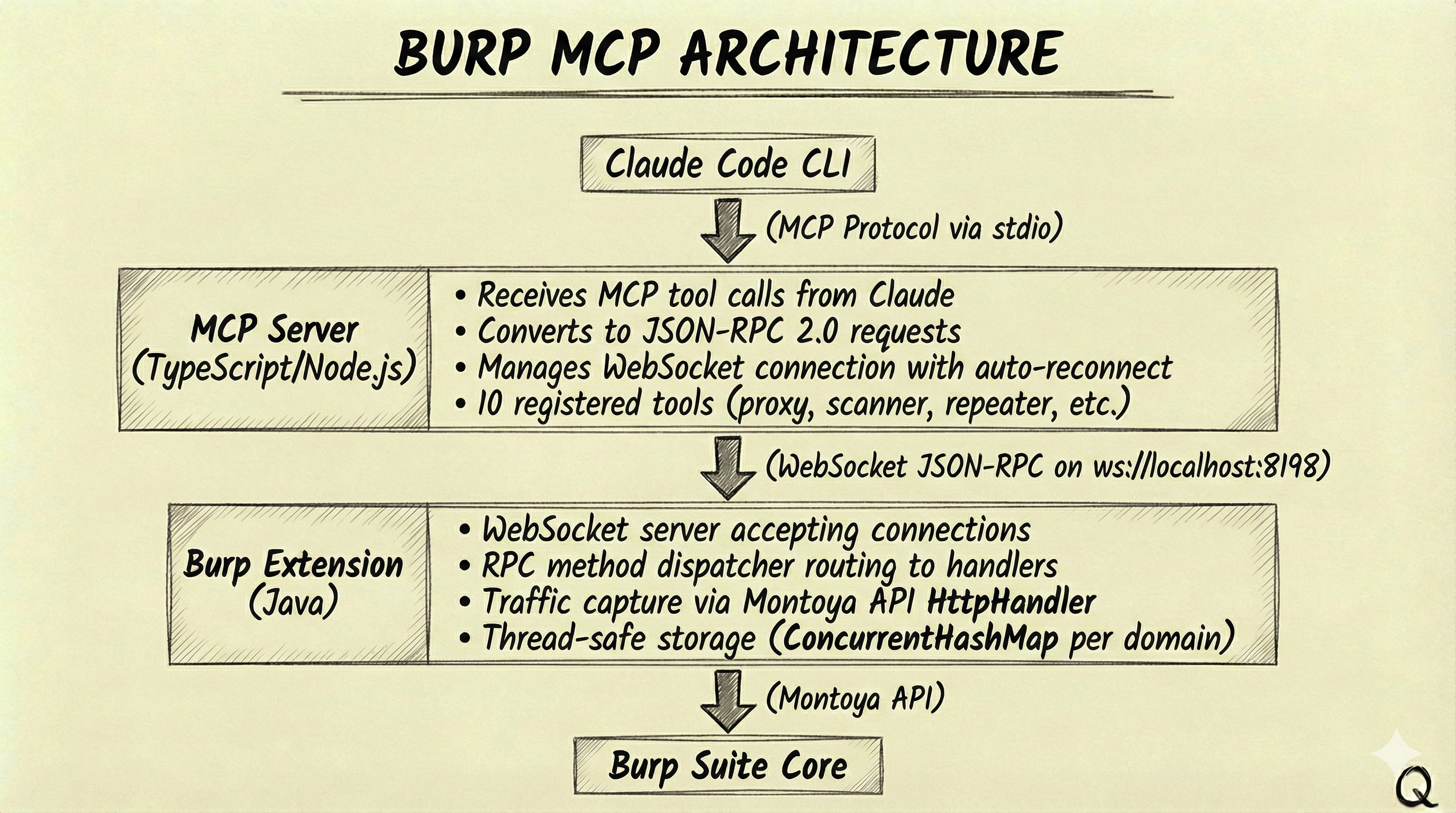
Key Capabilities
The MCP server exposes 10 tools covering the core Burp functionality. get_proxy_history queries captured HTTP requests by domain, method, or status code—essential for understanding what traffic flowed during a test. send_request sends custom HTTP requests through Burp with optional site map addition. send_to_repeater sets up requests in Repeater tabs for manual testing, and send_to_intruder configures fuzzing attacks with payload positions. For Burp Professional users, get_scanner_issues retrieves vulnerability findings from the active scanner, and start_scan/stop_scan control scan execution.
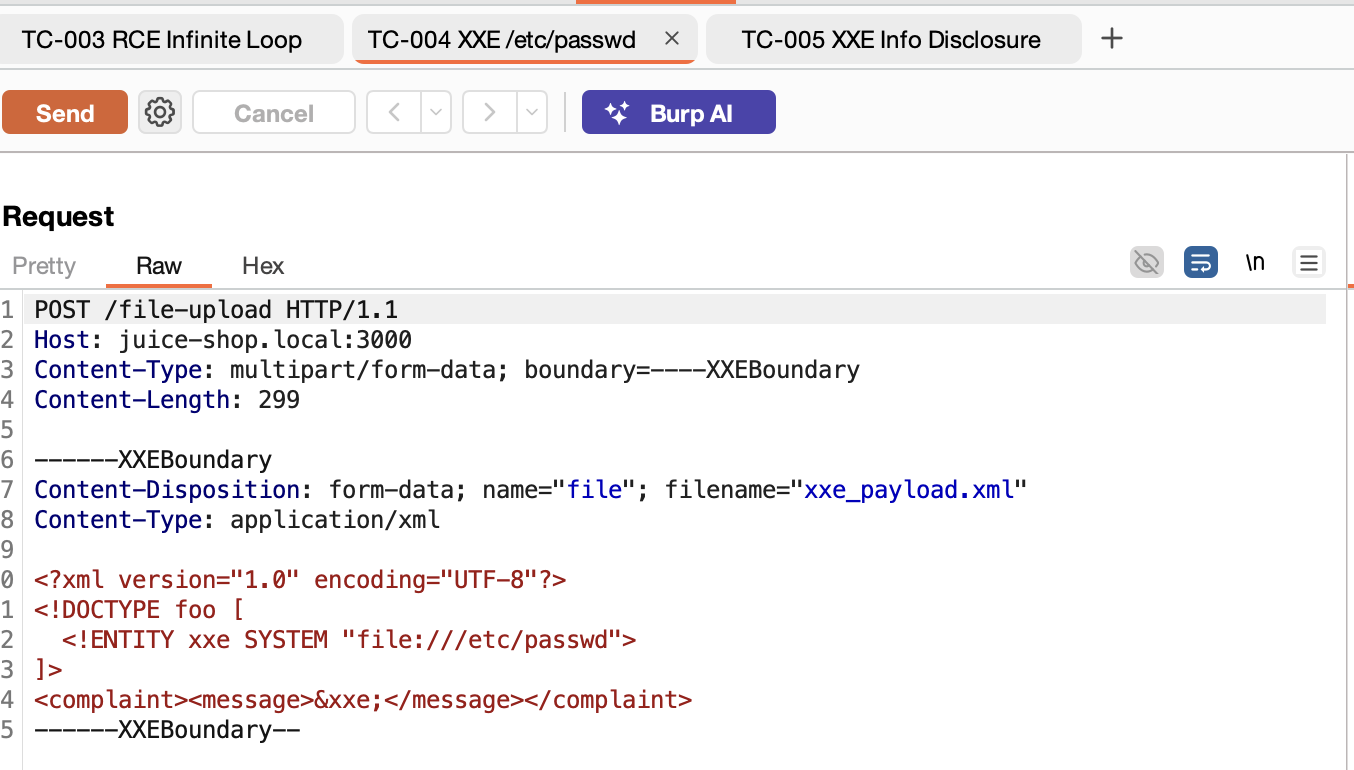
And yes there is already an official Burp mcp here. I just wanted to try out the montoya apis and create one tailored for claude code…is all that is….
Traffic Capture
The extension hooks into Burp’s proxy pipeline via the Montoya API HttpHandler interface. On every proxied response, it extracts the request (method, URL, headers, body) and response (status, headers, body, MIME type), truncates large bodies to a configurable limit (default 100KB), and stores everything in a thread-safe circular buffer per domain.
The storage uses a ConcurrentHashMap<Domain, ConcurrentLinkedDeque<StoredRequest>> structure. Requests are grouped by hostname, with the newest at the front and the oldest evicted when the per-domain limit (default 100 requests) is reached. This keeps memory bounded while ensuring recent traffic is always available for analysis.
Putting It All Together
The complete workflow starts with pointing ralph-code-review at a repository. The agent explores the codebase autonomously, creating and processing stories as it goes: endpoints get discovered and prioritized, inputs get traced to sinks, dangerous patterns get analyzed, and confirmed vulnerabilities get exploit code. The output is TEST_PLAN.md—a comprehensive test plan with ready-to-execute payloads.
Next, ralph-pentester takes that test plan and runs against the live application. It sets up authentication, executes each test case with the appropriate tools (curl, browser automation, or Burp), and collects evidence for confirmed vulnerabilities. The output is REPORT.md with findings that have been validated against actual application behavior.
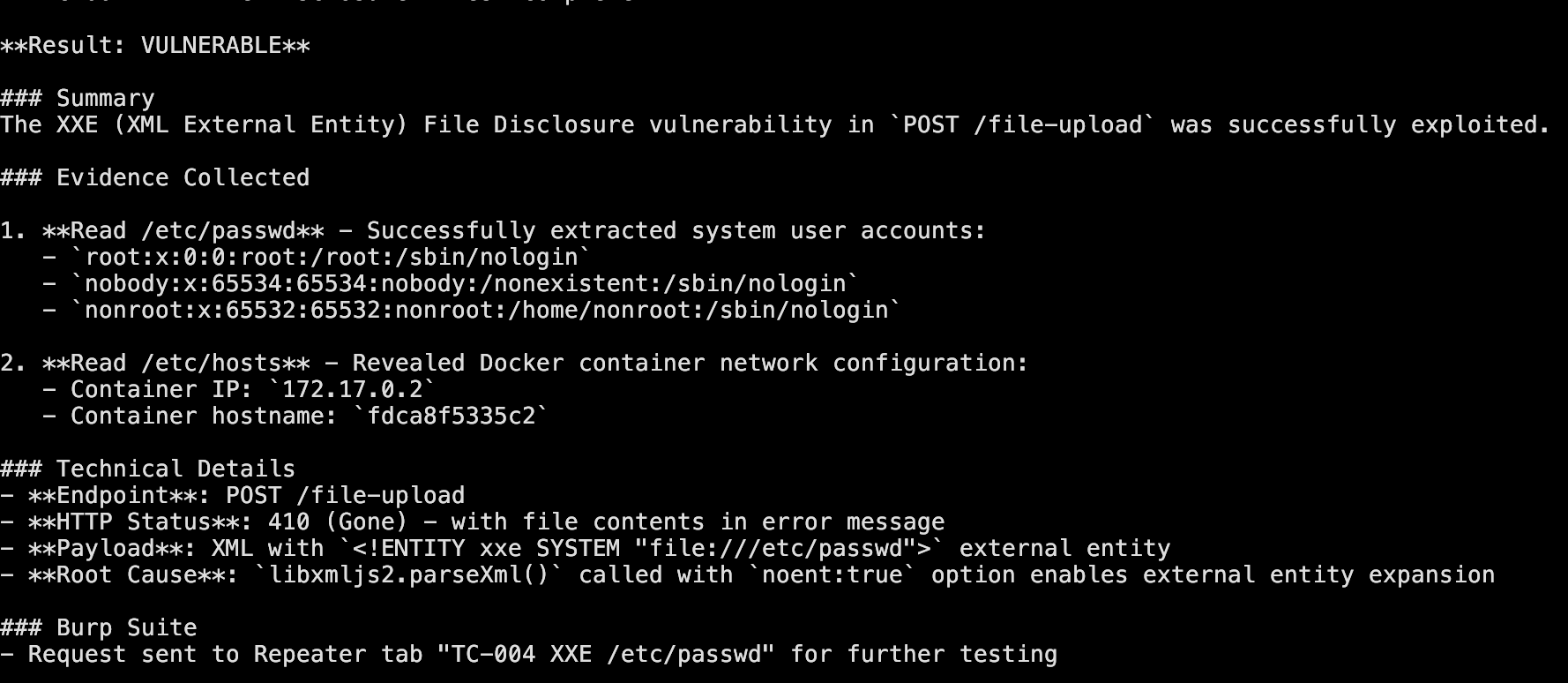
Well It Works!
The loop provides context (target repository, current state, available tools), boundaries (maximum iterations, tool permissions), and guidance (prompt templates with methodology). The agent provides exploration (which files to read, what patterns to search), analysis (how to trace data flows, what constitutes a vulnerability), and judgment (when analysis is complete, whether findings are exploitable).
This division is what makes the Ralph pattern work for security testing. The loop handles orchestration and state management—mechanical tasks that benefit from reliability. The agent handles investigation and reasoning—cognitive tasks that benefit from flexibility. Neither could do the other’s job well.
The Power and the Pain
When you step back and look at what’s happening here, it’s kind of remarkable. You have an AI agent with access to source code, an intercepting proxy, and a browser—all being orchestrated through a simple bash loop. It can read the code to understand how an endpoint works, craft an exploit, send it through Burp, verify the result in a browser, and capture evidence. All the pieces a pentester uses, wired together and running autonomously.
But here’s the reality check: this is expensive. I hit Claude Code usage limits constantly throughout development and testing. And that’s with the CLI subscription—I can’t imagine what this would cost running against the raw API for a large codebase. The priority ranking system I mentioned earlier wasn’t just good security practice; it was my workaround because I needed a way to stay within usage limits long enough to test the theory.
This is also a simplified approach. There are real scaling challenges though—handling massive codebases, parallelizing analysis across multiple agents, managing state when things fail mid-run. Solving those wasn’t the intent; I just wanted to see what this pattern might look like for security testing. As bloggers like to say, the rest is left as an exercise for the reader.
Limitations
Static analysis may identify issues that don’t exist in practice—dynamic validation helps filter false positives, but some will slip through. The agent works within defined boundaries and may miss vulnerabilities requiring creative exploitation chains or deep business logic understanding. Results should be reviewed by experienced security professionals who can assess context and risk. I maintain this is a complement to human expertise, not a replacement for it.
At the end of the day, I just wanted to hop on the Ralph Wiggum hype train in a domain I actually know something about. Turns out the ride is bumpy, expensive, and occasionally gets stuck—but when it works, it’s pretty fun to watch.
But yeah you get the idea and the possibilities here….
References
- The Ralph Wiggum Approach — DEV Community article explaining the technique
- Ralph Orchestrator — An implementation of the Ralph Wiggum pattern
- Model Context Protocol (MCP) — Protocol specification for AI tool integration
- OWASP Top 10 — Security vulnerability categories
- Burp Suite AI Pal Extension — Burp Suite MCP integration
The Ralph Pentest Loop adapts the autonomous agent pattern for security testing. The key insight from the original technique applies here too: define success criteria, let the agent iterate toward them, and treat failures as data that refines the next attempt. For penetration testing, this means systematic coverage with evidence-based validation—a useful complement to the expertise that security professionals bring to the table.